Zero-Skill Digital Products Anyone Can Make
1. Why Digital Products Don’t Require Talent or Experience
Most beginners assume digital products are only for tech-savvy creatives, designers, or people with special skills. The truth is the opposite. Many of the best-selling digital products online were created by people with no experience, no formal training, and minimal tools.
Today’s digital product market is booming because buyers want shortcuts. They don’t care about fancy design—they care about clarity, convenience, and speed. If you can organize information and present it cleanly, you can create a digital product that sells.
Platforms like Etsy, Gumroad, Payhip, and niche blogs are filled with profitable, simple resources: checklists, trackers, templates, wall prints, simple guides, and swipe files. People aren’t buying design—they’re buying solutions.
This guide breaks down exactly how you can build digital products even if you feel like you have zero talent, zero skills, and zero confidence.

2. Why Zero-Skill Digital Products Sell So Well
2.1 They Solve Small, Everyday Problems
Most customers don’t need a beautifully formatted ebook. They need a quick checklist, a simple planning sheet, or a straightforward guide that removes guesswork.
2.2 You Create Once, Get Paid Over and Over
Digital products scale because they require no reprinting or restocking. They become assets that can be sold thousands of times.
2.3 Buyers Don’t Care How Fancy It Looks
Minimalist layouts actually sell better because they’re easier to use. Simple lines, clean spacing, and clear wording beat elaborate designs.
2.4 Extremely Low Startup Cost
You can create your first product using nothing but free tools.
2.5 Fastest Path Into Digital Entrepreneurship
No inventory, no shipping, no customer service headaches—just simple value delivered digitally.
3. The Easiest Zero-Skill Digital Products to Create
These are products that literally anyone can make using Google Docs, Canva, or Sheets.
3.1 Checklists
Checklists are simple, direct, and sell every day.
Examples:
- moving checklist
- cleaning checklist
- travel packing list
- business startup checklist
- morning routine checklist
A basic checklist can be made in 10–15 minutes.
3.2 Templates
Templates provide structure—something many buyers struggle to create themselves.
Examples:
- budget templates
- resume templates
- social media content templates
- habit trackers
- blog post templates
- meal planning templates
People love plug-and-play formats.
3.3 Swipe Files
A swipe file is a ready-made collection of content people can copy, paste, or adapt.
Examples:
- email subject lines
- sales scripts
- outreach messages
- content ideas
- Instagram hooks
Swipe files are pure value: clear, organized examples that remove thinking.
3.4 Printables
Printables dominate Etsy because they’re easy to create and easy to deliver.
Examples:
- wall art
- planner pages
- kids’ worksheets
- journal prompts
- habit logs
- daily routine sheets
Minimal design is all you need.
3.5 Mini Ebooks and Micro-Guides
A powerful guide doesn’t need to be long. Many profitable digital guides are 8–20 pages.
Examples:
- quick-start home organizing guide
- beginner meditation guide
- “How to start a side hustle in one weekend” guide
- productivity blueprint for beginners
Keep it simple and actionable.
3.6 Trackers and Logs
Tracking tools help people stay consistent.
Examples:
- fitness logs
- water tracking sheets
- reading logs
- mood trackers
- business expense logs
These are incredibly easy to create in Sheets or Docs.
3.7 Planners
Planners work in any niche.
Examples:
- blogging planner
- small business planner
- weekly life planner
- daily productivity planner
- homeschooling planner
Planners are predictable, useful, and evergreen.
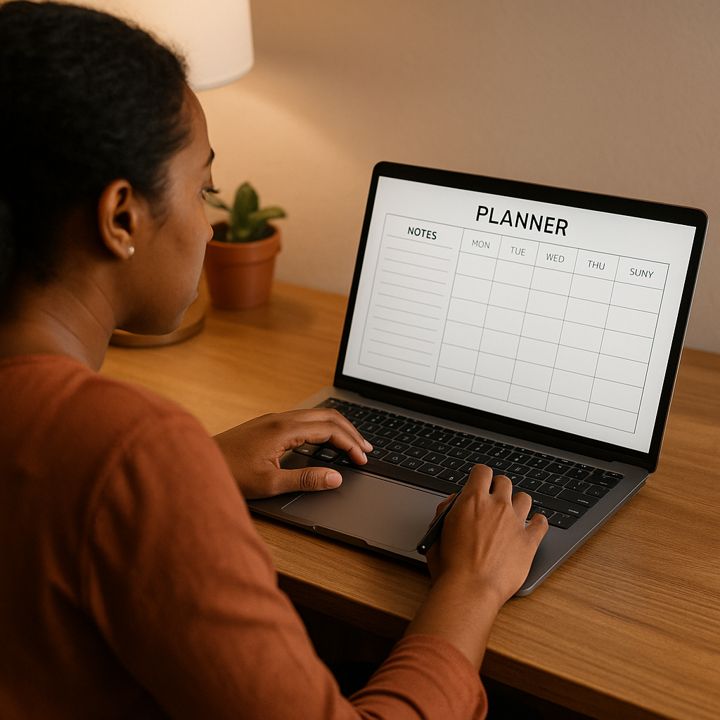
3.8 Lists and Resource Packs
This is the easiest format of all.
Examples:
- 100 niche ideas
- 100 meal prep ideas
- 50 TikTok hook ideas
- 200 side hustle ideas
- 100 journal prompts
Organize information and package it neatly. That’s it.
3.9 Scripts and Prompts
These require zero design, zero skills, and zero complexity.
Examples:
- journaling prompts
- affirmations
- interview questions
- classroom prompts
- video script starters
Organized words. Nothing more.
4. The Tools You Actually Need
You don’t need expensive software or professional design programs.
4.1 Free Tools
- Google Docs
- Google Sheets
- Canva Free
- Notion
- Apple Notes
These cover 95% of beginner needs.
4.2 Beginner-Friendly Paid Tools
- Canva Pro (optional)
- Affinity Publisher (one-time purchase)
- Microsoft Office
4.3 Recommended Laptop for Digital Product Creation
A fast, reliable laptop speeds up your workflow dramatically.
Acer Aspire 5 Slim Laptop
A dependable, budget-friendly laptop that handles Canva, Docs, Sheets, and multitasking without freezing. Lightweight, strong battery life, ideal for creating digital products at home or on the go.

5. How to Package Zero-Skill Digital Products Like a Pro
Your product doesn’t need to be fancy—but it must be clean and easy to use.
5.1 Export in the Correct Format
- PDF for planners, logs, checklists, guides
- PNG for wall art
- ZIP for bundles or multiple files
5.2 Include a Simple Cover Page
Helps your product look complete and professional.
5.3 Add Clear Instructions
Customers love clarity. A one-page “How to Use This” guide improves satisfaction and reviews.
5.4 Add a CTA to the End of Your Product
Invite buyers to:
- join your email list
- check out your store
- download related products
Simple, effective upselling.
6. How to Sell Zero-Skill Digital Products
There are several beginner-friendly platforms.
6.1 Etsy
Great for printables, planners, templates, kids’ worksheets, trackers, and wall art.
6.2 Gumroad
Perfect for swipe files, prompts, templates, and micro-guides.
6.3 Your Blog
Add product blocks and content upgrades. Your blog becomes a passive sales engine.
6.4 Social Media
Short videos showing your product in action can drive fast sales.
6.5 Email List
Email converts better than any platform. Start simple: weekly tips with product mentions.
7. How to Build Products That Actually Sell
You don’t need skill—you need strategy.
7.1 Solve One Problem
Make your product laser-focused.
7.2 Keep It Minimal
Clean design > fancy design.
7.3 Choose a Niche and Stay With It
Theme and consistency matter more than variety.
7.4 Create Bundles
Bundles increase average order value and perceived value.
7.5 Build Seasonal Products
Halloween, Christmas, New Year, wedding season, back-to-school—seasonal printables sell fast.
8. Outsourcing Options for Zero-Skill Creators
You can outsource parts of or the entire creation process if you want.
Platforms
- Fiverr
- Upwork
- Onlinejobs
Tasks You Can Outsource
- cover design
- formatting
- illustrations
- layout creation
You remain the creator and visionary while others handle technical polish.

9. How to Scale Your Digital Product Income
Scaling is simple because digital products compound.
9.1 Build More Products
The more products you create, the more you earn.
9.2 Create Complementary Niche Stores
Sell matching items, themed bundles, and expanded versions.
9.3 Sell Templates of Your Templates
Turn your own designs into reusable formats.
9.4 Add a Membership
A monthly printable club or template pack creates recurring revenue.
9.5 Build an Email List That Buys
Email is your most reliable sales channel.
10. Common Myths About Zero-Skill Digital Products
Myth 1: “Everyone sells these.”
Demand is enormous; supply barely scratches the surface.
Myth 2: “My design skills aren’t good enough.”
Minimalist designs consistently outsell ornate ones.
Myth 3: “I don’t know what to create.”
Your niche’s search demand will hand you the ideas.
Myth 4: “I can’t compete with established sellers.”
Micro-niches eliminate competition.
11. FAQ
What product should beginners start with?
Checklists, resource lists, or templates.
How long does it take to create a product?
Anywhere from 10 minutes to several hours.
Do I need paid software?
No. Free tools are enough to get started.
How do I know what to create?
Follow search demand, buyer behavior, and seasonal trends.
How much can digital products earn?
Some creators make a few hundred a month; some make thousands. Volume and niche matter most.
12. Thoughts: The Easiest Online Business for Total Beginners
Zero-skill digital products are the simplest entry point into an online business. They don’t require creativity, technical ability, or advanced software. They require clarity, consistency, and the willingness to start with simple ideas that solve real problems.
You need simple ideas, simple tools, and the willingness to start.
As your digital engine revs up, think about scaling your little project into a real stream of income. Explore feedback, make tweaks, and keep an eye on trends. What starts as a simple checklist could expand into a collection of resources, cementing your reputation in a niche market. It’s all about starting small, iterating, and growing alongside the community of users you’ll build.
👉 And if you want a training community that walks you through building digital income streams step by step, don’t sleep on Wealthy Affiliate. It’s the smartest place to sharpen your online business strategy.